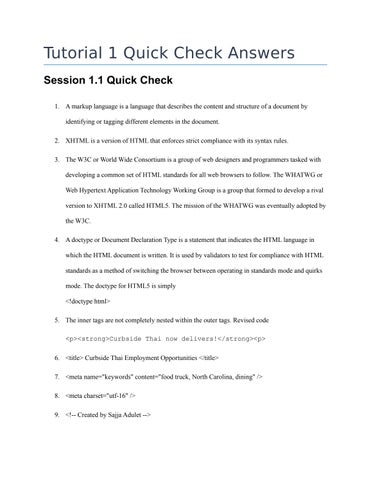
Tutorial 1 Quick Check Answers Session 1.1 Quick Check 1. A markup language is a language that describes the content and structure of a document by identifying or tagging different elements in the document. 2. XHTML is a version of HTML that enforces strict compliance with its syntax rules. 3. The W3C or World Wide Consortium is a group of web designers and programmers tasked with developing a common set of HTML standards for all web browsers to follow. The WHATWG or Web Hypertext Application Technology Working Group is a group that formed to develop a rival version to XHTML 2.0 called HTML5. The mission of the WHATWG was eventually adopted by the W3C. 4. A doctype or Document Declaration Type is a statement that indicates the HTML language in which the HTML document is written. It is used by validators to test for compliance with HTML standards as a method of switching the browser between operating in standards mode and quirks mode. The doctype for HTML5 is simply <!doctype html> 5. The inner tags are not completely nested within the outer tags. Revised code <p><strong>Curbside Thai now delivers!</strong><p> 6. <title> Curbside Thai Employment Opportunities </title> 7. <meta name="keywords" content="food truck, North Carolina, dining" /> 8. <meta charset="utf-16" /> 9. <!-- Created by Sajja Adulet -->
Session 1.2 Quick Check 1. <h2> Gourmet Thai Cooking</h2> 2. The aside element 3. The div element is used to mark a division and it was a major structural element prior to the introductions of sectioning and semantic elements in HTML5. 4. The hr element 5. <em> Daily Special</em> 6. H<sub>2</sub>SO<sub>4</sub> 7. <link href="mystyles.css" rel="stylesheet" type="text/css" /> 8. — 9.
<img src="awlogo.png" alt="Art World" />
Session 1.3 Quick Check 1. <ul> <li>Packers</li> <li>Vikings</li> <li>Bears</li> <li>Lions</li> </ul> 2. <ol start="5" descending> <li>Pulp Fiction</li> <li> The Dark Knight </li>
<li> The Godfather: Part II </li> <li> The Godfather </li> <li> The Shawshank Redemption </li> </ol> 3. The description list is grouped by the dl (description list) element, the terms are marked with the dt (description term) element, and the description(s) associated with each term is marked by the dd element. 4. <nav> <ul> <li><a href="index.html">Home</a></li> <li><a href="faq.html">FAQ</a></li> <li><a href="contacts.html">Contact Us</a></li> </ul> </nav> 5. ../catering/ct_catering.html 6. glossary.html#c_terms 7. https://www.example.com/curbside 8. mailto: sajja@curbside.com?subject=FYI 9. tel:+19705550002
Tutorial 2 Quick Check Answers Session 2.1 Quick Check
10. Inline styles are styles that are applied to a specific element using the style attribute. Embedded styles are added to a specific HTML file using the style element in the document head. External style sheets are external files containing CSS style rules that are linked to an HTML file or files. To provide designs for an entire website, use external style sheet files. 11. !important 12. /* Tri and Succeed Sports Color Styles */ 13. blockquote {color: rgb(255, 0, 0);} 14. address {color: black; background-color: hsl(90, 100%, 50%);} 15. A technique by which the latest style properties are listed last in the style rule so that older browsers are supported by the older standards and new browsers can still take advantage of the newest standards. 16. color: rgb(232, 121, 50); 17. h1, h2 {background-color: rgba(255, 255, 0, 0.7);
Session 2.2 Quick Check 18. footer > address 19. h1#top {font-family: 'Century Gothic', Helvetica, sans-serif;} 20. 18px 21. body {font-size: 2vw;} 22. nav a {text-decoration: none;} 23. @font-face { font-family: Cantarell;
src: url(cantarell.woff) format('woff'), url(cantarell.ttf) format('ttf'); } 24. blockquote.Reviews { font-style: italic; text-indent: 3em; } 25. h1, h2, h3, h4, h5, h6 { text-align: center; font-weight: normal; }
Session 2.3 Quick Check 26. ul {list-style-type: lower-alpha;} 27. ul { list-style-image: url(star.png); list-style-position: inside; } 28. a:visited {color: gray;} 29. section h1 { padding: 1em 0.5em 2em; } 30. figure {margin-left: 20px;} 31. The first line of the first paragraph within the element with the id "top".