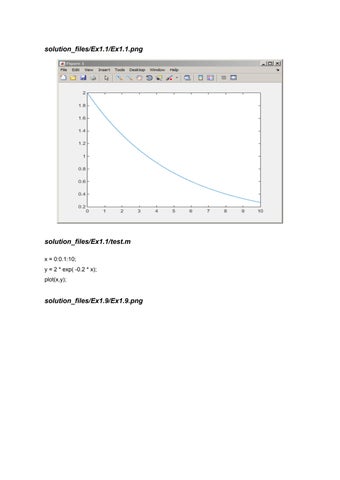
solution_files/Ex1.1/Ex1.1.png
solution_files/Ex1.1/test.m x = 0:0.1:10; y = 2 * exp( -0.2 * x); plot(x,y);
solution_files/Ex1.9/Ex1.9.png
solution_files/Ex1.9/test2.m % Create an input array from 2*pi to 2*pi t = -2*pi:pi/10:2*pi; % Calculate |sin(t)| x = abs(sin(t)); % Plot result plot(t,x);
solution_files/Ex2.1/array1.dat Data/auxiliary file.
solution_files/Ex2.1/array1.mat Data/auxiliary file.
solution_files/Ex2.10/Ex2.10.png
solution_files/Ex2.10/ball.m % Script file: ball.m % % Purpose: % To calculate and display the trajectory of a ball % thrown upward at a user-specified height and speed. % % Record of revisions: % Date Programmer Description of change % ==== ========== ===================== % 03/03/15 S. J. Chapman Original code % % Define variables: % g -- Acceleration due to gravity (m/s^2) % h -- Height (m) % h0 -- Initial height (m) % t -- Time (s) % v -- Vertical Speed (m/s) % v0 -- Initial Vertical Speed (m/s)
% Initialize the acceleration due to gravity g = -9.81; % Prompt the user for the initial velocity. v0 = input('Enter the initial velocity of the ball: '); % Prompt the user for the initial height h0 = input('Enter the initial height of the ball: '); % We will calculate the speed and height for the first % 10 seconds of flight. (Note that this program can be % refined further once we learn how to use loops in a % later chapter. For now, we don't know how to detect % the point where the ball passes through the ground % at height = 0.) t = 0:0.5:10; h = zeros(size(t)); v = zeros(size(t)); h = 0.5 * g * t .^2 + v0 .* t + h0; v = g .* t + v0;
solution_files/Ex2.11/dist2d.m % Script file: dist2d.m % % Purpose: % To calculate the distance between two points on a % Cartesian plane. % % Record of revisions: % Date Programmer Description of change % ==== ========== ===================== % 03/03/15 S. J. Chapman Original code % % Define variables: % dist -- Distance between points % x1, y1 -- Point 1 % x2, y2 -- Point 2 % Prompt the user for the input points
x1 = input('Enter x1: '); y1 = input('Enter y1: '); x2 = input('Enter x2: '); y2 = input('Enter y2: '); % Calculate distance dist = sqrt((x1-x2)^2 + (y1-y2)^2); % Tell user disp (['The distance is ' num2str(dist)]);
solution_files/Ex2.12/dist3d.m % Script file: dist3d.m % % Purpose: % To calculate the distance between two points on a % three-dimensional Cartesian plane. % % Record of revisions: % Date Programmer Description of change % ==== ========== ===================== % 03/03/15 S. J. Chapman Original code % % Define variables: % dist -- Distance between points % x1, y1, z1 -- Point 1 % x2, y2, z2 -- Point 2 % Prompt the user for the input points x1 = input('Enter x1: '); y1 = input('Enter y1: '); z1 = input('Enter z1: '); x2 = input('Enter x2: '); y2 = input('Enter y2: '); z2 = input('Enter z2: '); % Calculate distance dist = sqrt((x1-x2)^2 + (y1-y2)^2 + (z1-z2)^2); % Tell user